What 157 after-hours calls actually do for a dental practice
· Jack Jia · 7 min read
- xona
- dental
- after-hours
- oryx
- production-data
A Toronto-area implant-focused practice has been running Xona as an after-hours-only phone line since August 2025. Their front desk handles the day; Xona handles the rest.
This post pulls a 60-day sampling window out of that deployment — calls from mid-March 2026 to mid-May 2026 — and shows what the line actually does. The line is still live as of publishing; this is not a trial recap.
Practice name omitted at the operator’s discretion. Metrics verified against production on 2026-05-11. The 60-day window is a snapshot — not the customer’s total usage — and is representative of the ongoing pattern.
Deployment context
| Dental software | Oryx (cloud, REST API — no on-prem tunnel agent) |
| Live since | 2025-08-19 (~9 months at time of writing) |
| Lifetime calls handled | 763 |
| Recent volume | ~96 calls in the last 30 days |
| Deployment mode | After-hours-only — all calls routed to Xona outside business hours |
| In-hours routing | Stays with front desk (Xona almost never sees in-hours traffic) |
The 60-day sampling window
| Count | |
|---|---|
| Calls Xona answered | 159 |
| After-hours | 157 (99%) |
| In-hours | 2 |
| Appointments booked | 13 |
| Requests captured for staff follow-up | 35 |
| Goal-achieved rate | 36.9% |
| Average call duration | ~45 sec |
The 99% after-hours share is structural: routing only sends calls to Xona outside the practice’s working_hours JSON in Oryx. In-hours calls hit the front desk first.
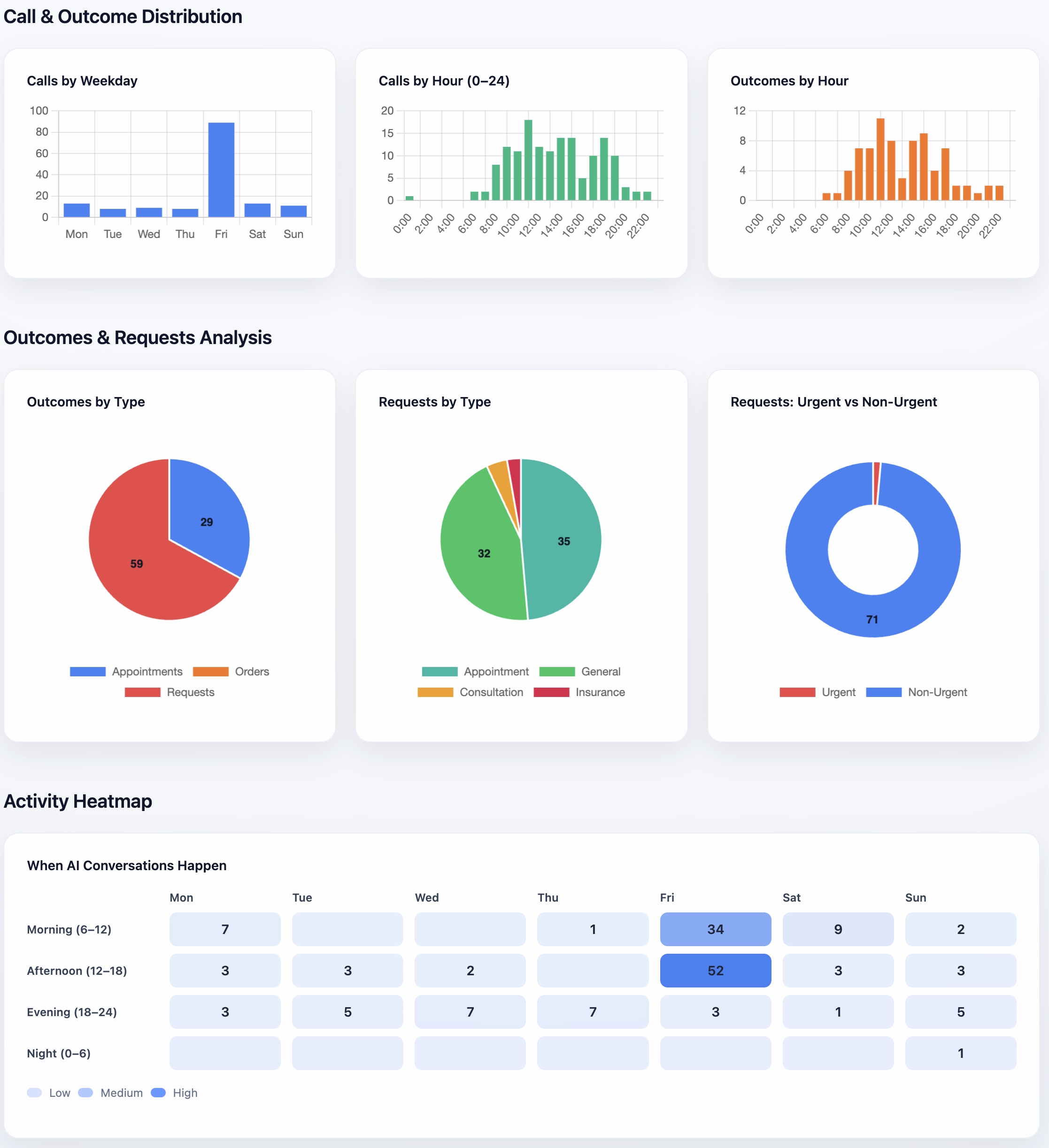
The Fri spike in the weekday chart is the leading edge of weekend after-hours volume — calls coming in Friday evening before the office reopens Monday. The afternoon-to-evening cluster in the heatmap is the typical after-hours pattern: people calling between dinner and bedtime. Data is the 60-day sampling window ending 2026-05-11; screenshot taken 2026-05-11.
What “goal-achieved” means here
Every call is classified after the fact by an LLM scoring the transcript against the caller’s apparent goal. A call counts as goal-achieved when the AI did the thing the caller actually wanted:
- patient wanted to book → appointment was created in Oryx
- patient wanted to reschedule → reschedule captured for staff
- patient asked about hours / services / location → answered correctly
- caller wanted to leave a message for the doctor → captured with name + reason
Of the 159 calls in the sampling window, 58 closed with a clean win. Another 50 captured enough information for the front desk to follow up the next morning — not a Xona win on its own, but the patient was not lost.
How a booking actually lands in Oryx
When the AI books an appointment for this practice, it doesn’t just record the booking in our database — it writes it directly to Oryx through Oryx’s REST API. The appointment shows up on the practice’s normal schedule view the next morning, with our system listed as the source. The front desk sees a real booking, not a “follow up” stub.
This matters more than it sounds. Most “AI receptionist” products are overlay systems — they take a message, then ask a human to copy it into the real schedule. Xona is integrated. The appointment is in the schedule when staff opens it.
(The short version of the engineering side: each dental software system gets its own adapter with its own write path; the AI is the same.)
What this changed for the front desk
The staff stopped doing three things they used to do every Monday morning.
The first was triaging the voicemail pile. 7am used to mean a dozen-plus voicemails to listen through. Now the front desk opens to a digest: who called, what they wanted, what Xona told them, and which appointments are already sitting in the Oryx schedule.
The second was calling people back to find out why they called. Roughly half of after-hours voicemails are “please call me back” with no reason attached. Xona asks during the call, so the discovery round-trip just disappears.
The third was apologizing. Patients who call at 7pm and reach a live voice — even an AI one — don’t start the next conversation already annoyed.
What this means for revenue
The 13 appointments captured in this 60-day window were calls that would otherwise have been a voicemail. New-patient first-visit value at a Toronto-area implant practice is substantial; even at a conservative $400 in production per appointment, this is ~$5k per quarter of recovered revenue.
Lifetime, this practice has handled 763 calls. The 60-day pace is representative — extrapolating across the full deployment, that’s a multi-times-larger recovery footprint. We don’t publish a single dollar figure for the practice because LTV varies too much to honestly extrapolate, but the math is countable per-clinic against their own data.
What this means for patients
The thing patients notice is they got an answer. Most of the after-hours calls in this dataset are:
- “What are your hours tomorrow?”
- “Do you take CDCP?”
- “My crown fell off, what do I do tonight?”
- “I think I need to reschedule but I forgot when.”
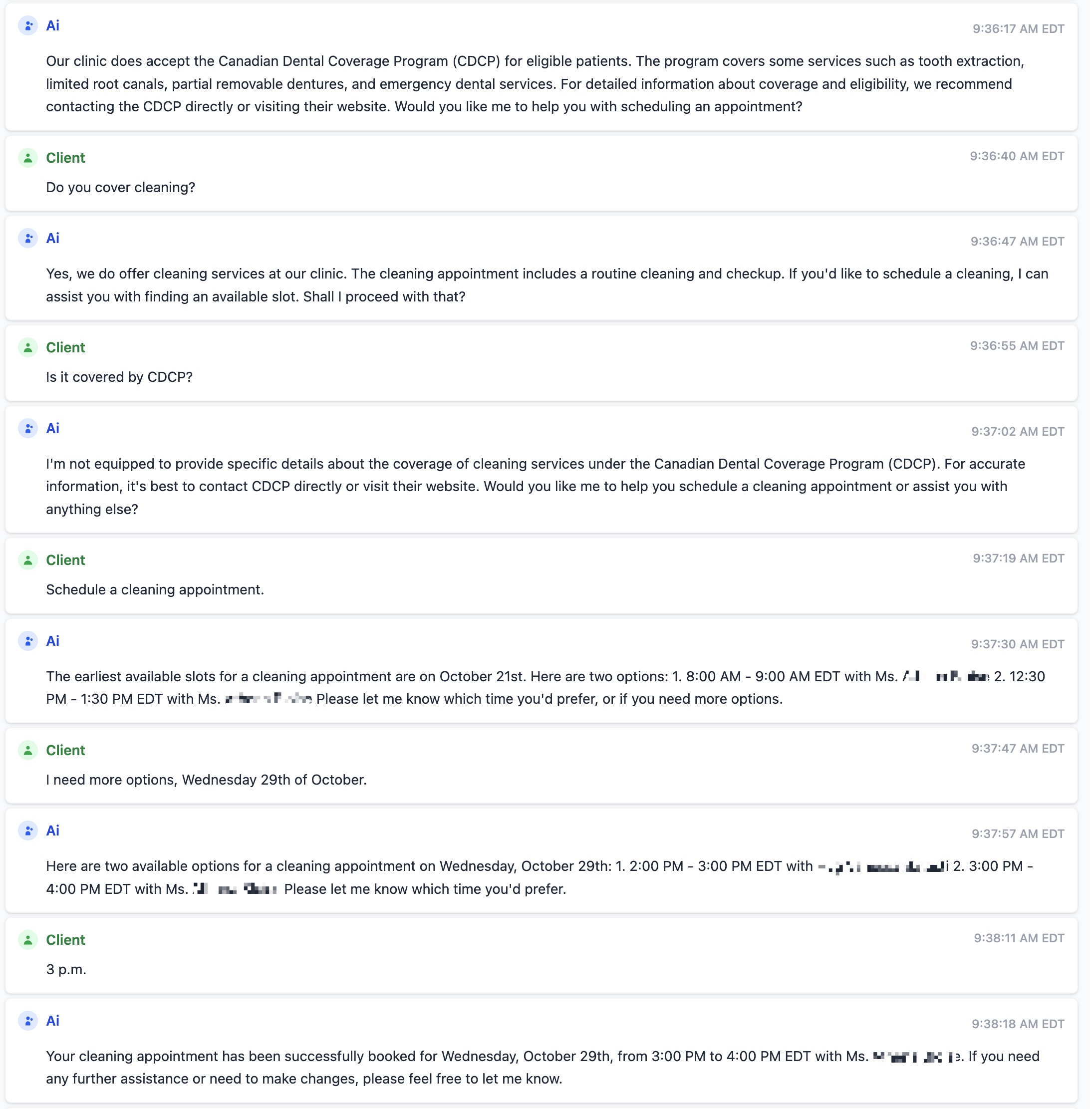
These are not new-patient acquisition calls. They are existing patients who, in the absence of a live line, would have either driven to the office or stewed for 14 hours. The patient-experience win is the smallest-numbered effect of the system and the most invisible. We don’t have a satisfaction metric to point at; we have the count of conversations that didn’t go to silence.
What this doesn’t say
A few things we want to be careful not to claim. The front desk’s job didn’t get easier — they’re still busy in-hours. What changed is that the off-hours spillover stopped flooding back into Monday morning. Xona isn’t better than a great human receptionist either; it’s better than a great human receptionist who has gone home. And the 36.9% conversion rate is just what this practice produced in a 60-day window. Every clinic will be different, and we’ll publish ranges as the dataset gets bigger.
How a clinic gets here
It is one phone-number-routing decision. After 5pm on weekdays and all day weekends, calls forward to Xona’s number for the practice. In-hours calls keep going to the front desk untouched. No retraining for staff. No new login for the front desk team.
We run reviewed dental-software workflows on ClearDent, Tracker, and Oryx today. For other practice software, we confirm the safest workflow path before any pilot.
If you run a Canadian dental practice and want to see what your own after-hours number is doing right now, we run a free 2-week after-hours pilot: you forward your line after 5pm (or your existing voicemail flow) to a number we provision, we handle the calls, and at the end of week 2 you get the same kind of report this practice has — your call volume, your goal-achieved rate, your booked-vs-captured split. Your existing setup doesn’t change; if the numbers aren’t there, you keep the report and we move on.
Try the estimate first: After-Hours / Overflow ROI Calculator. If the math is interesting, start the free Dental Leakage Scan.