When the AI line works during business hours, not just after
· Jack Jia · 7 min read
- xona
- dental
- overflow
- cleardent
- production-data
The default mental model for an AI receptionist is “after-hours backstop.” Forward the calls when the office is closed, let humans run the day. That story is real — we wrote about it here — 157 after-hours calls in 60 days at a Toronto-area implant-focused practice.
This post is about the less-told version: what happens when you leave the AI line on during business hours too.
Practice name omitted at the operator’s discretion. Metrics verified against production on 2026-05-11. The 60-day window is a snapshot — the customer is still in active production at time of writing.
Deployment context
| Dental software | ClearDent (on-prem SQL Server via tunnel agent) |
| Live since | 2025-10-22 (~7 months at time of writing) |
| Lifetime calls handled | 295 |
| Recent volume | ~133 calls in the last 30 days |
| Deployment mode | 24/7 — Xona catches overflow during business hours AND covers off-hours |
| In-hours routing | Front desk answers first; rolls to Xona after ~3 rings |
The 60-day sampling window
| Window | Calls | Appts created | Requests captured | Goal-achieved |
|---|---|---|---|---|
| In-hours | 152 | 11 | 31 | 30.9% |
| After-hours | 83 | 3 | 17 | 27.7% |
The surprising number is that in-hours conversion is slightly higher than after-hours. The AI converts at a better rate during business hours than after them.
That’s not what we expected. The conventional wisdom — and our own — was that after-hours would be the cleaner environment, with the AI handling whole conversations end-to-end and no competing voices. In-hours, we expected handoffs, interruptions, and confused callers.
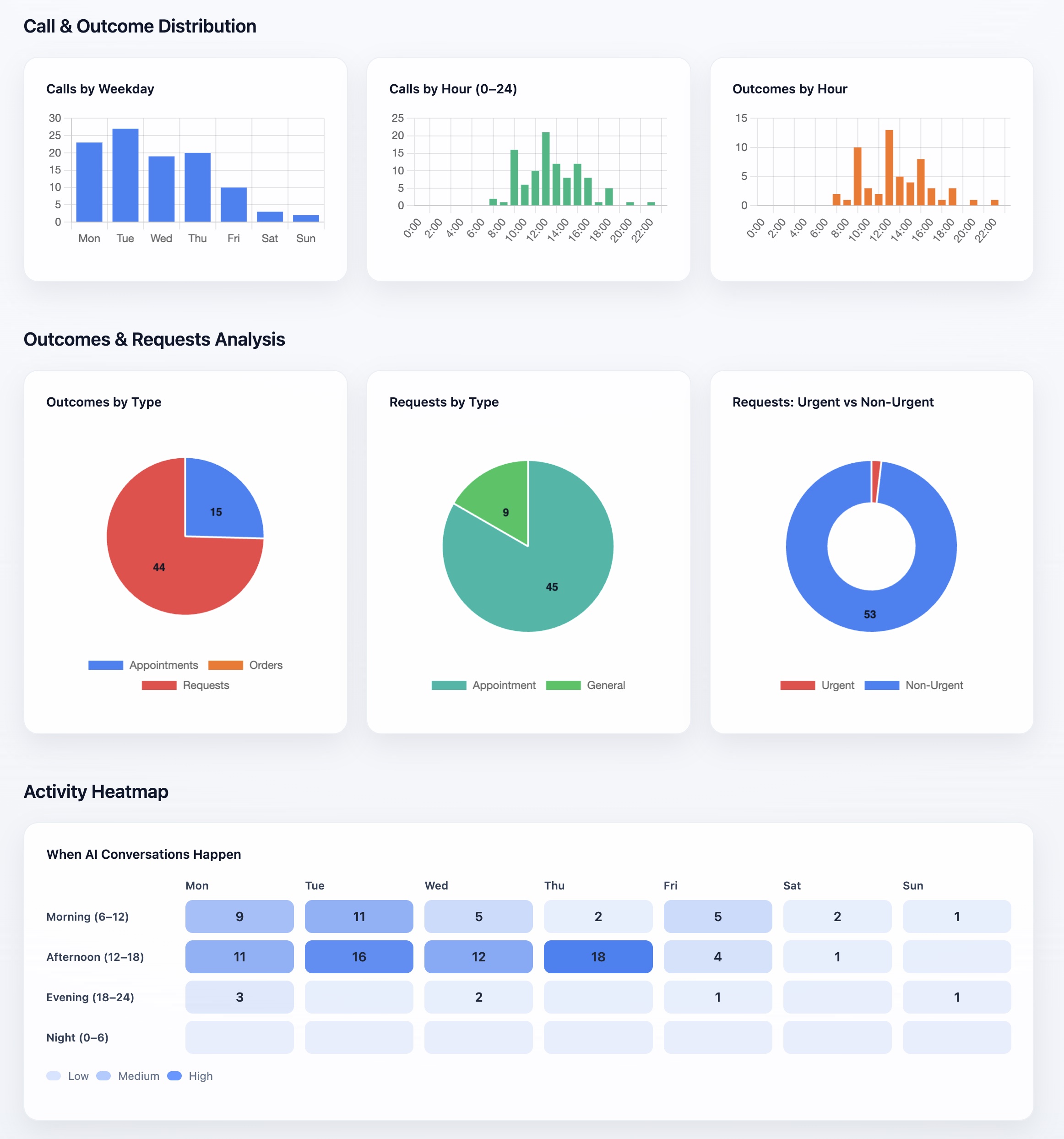
Data covers the 60-day sampling window ending 2026-05-11. The Mon–Thu spread in the weekday chart is the in-hours overflow pattern; the afternoon-heavy “When AI Conversations Happen” cells line up with the post-lunch peak when the front desk is busiest. Screenshot from our internal analytics dashboard, taken 2026-05-11.
Two things probably explain why in-hours holds up. The first we’re more confident about than the second.
The confident one: in-hours callers have higher intent. Someone calling a dental office at 10am on a Tuesday has a reason. They’re trying to book, reschedule, or get an answer to a specific question. After-hours skews toward people who couldn’t reach during the day, which is a wider intent mix. Higher-intent callers convert better against any responder — AI or human.
The other one: overflow protects the moments that matter most. In a busy practice, the staff is on the phone, the call rolls to the AI, and the patient gets answered immediately instead of sitting on hold or going to voicemail. The patient most likely to book is the one whose call gets answered in under ten seconds. Xona picks up in under two seconds — median across all deployments.
How ClearDent writes work
When Xona books an appointment for this practice, it writes directly into ClearDent’s SQL Server database through a tunnel agent installed on the practice’s network. The appointment appears on the front desk’s normal schedule view, with chair and provider already assigned. This is not “AI books somewhere, staff copies it in” — the appointment IS in ClearDent the moment Xona finishes the call.
The same write path also captures requests (when AI doesn’t book autonomously but takes enough info for the front desk to act). Behind that is a chunk of schema work we did against ClearDent’s tbl_SchApp, tbl_Customer, and recall-attribution tables (tbl_RecAtt, tbl_SchApp.fld_intRecAttId). That ClearDent schema reference lives in our internal wiki; it’s the basis for how we know what we can and can’t safely write into a live practice’s database.
For practices on ClearDent specifically, that schema knowledge is what makes Xona’s writes safe — we know which fields are append-only, which have practice-specific status code semantics (e.g. fld_bytStatus meaning differs per tenant), and which rows must round-trip through the practice’s own status workflow.
What 24/7 actually changes for the front desk
A 24/7 deployment is a different proposition from an after-hours-only one. It’s not “we replace your front desk” — the staff still picks up the first ring on every call, and Xona is only catching overflow. It’s closer to “we keep your front desk from being the bottleneck.” During peak times, like the post-lunch rush or those snow days when half the city decides to reschedule, one or two staffers on the phones can’t keep up, and the AI absorbs the spike instead of voicemail eating it.
The thing it doesn’t do is make in-hours easier. Same number of patients, same number of conversations. What changes is which calls waited and which ones got answered now.
What this means for revenue
The 11 in-hours appointments captured in the window were calls that came in while the staff was already on the phone with someone else. Without the AI on overflow, those would have been one of:
- Hold queue → a large share of callers hang up within the first minute
- Voicemail → most callers won’t leave a message
- Lost — patient calls the clinic next door
Lifetime, this practice has handled 295 calls. At the 60-day pace, the appointment-creation share is consistent. The practice owner has the math; we have the pickup count.
What patients experience
What patients notice: their call got answered. The front desk was busy, the AI picked up, the AI asked their reason, the AI either booked them directly in ClearDent or captured their info for the front desk to follow up.
The friction the patient would have felt — hold music, then voicemail, then a callback the next day — does not happen. From the patient’s seat, the practice has more staff than it actually does.
We do not have a patient satisfaction survey. We have the call-outcome data showing what happens in each conversation. The negative signal we watch is hangup_early (patient hung up within a few seconds of pickup, which usually means they didn’t want to talk to AI). hangup_early runs around 15–20% across the dental practices we monitor (production data, verified 2026-05-11).
When 24/7 is and isn’t the right call
24/7 is right when the practice is busy enough that staff are often on the phone with someone, when the owner is comfortable letting an AI take the first conversation (not all are, and that’s fine), and when there’s at least one full-time admin person so the AI is genuinely overflow and not the only voice on the line.
It’s not right when the front desk has plenty of capacity and almost never misses a live answer — the AI just sits idle in-hours. It’s also not right when the owner isn’t comfortable with patients hearing an AI voice during the day, even if the math works on paper. We’ve also had a couple of practices with older patient bases that strongly prefer human voices in-hours; that’s a case-by-case conversation, not a math one.
How a clinic gets here
Same routing decision as after-hours-only, just with the threshold tightened. After 3 rings (or 2, or whatever the practice picks), the call rolls to Xona instead of voicemail. In-hours, the AI mostly captures overflow; after-hours, it catches everything.
If you want to see what your in-hours overflow looks like — how many calls roll to voicemail because the front desk is on another line — we run a free 2-week pilot: pick the window (after-hours-only or 24/7 overflow), forward to a number we provision, and at the end of week 2 you get a report sized to your call volume. Setup is one rule change on your existing line; if the numbers aren’t there, you keep the report.
Try the estimate first: After-Hours / Overflow ROI Calculator. If the math is interesting, start the free Dental Leakage Scan.